





I had an interesting experience upgrading my seats in for my return flight from Florida earlier this week. Perhaps it was because I was driving and trying to coach my wife through it on two different phones (one for the 2 of us and one for our companion reservation). Perhaps it was because neither of us had previously navigated this scenario on the Southwest app. Or perhaps it was the “gotta do it now” T-48 rush I predicted earlier this year.
In that post I wrote: “A-List members (not A-List Preferred members, they can select extra legroom at time of booking) and premium credit card holders (Priority personal and Performance business cards) will now have the ability to select available extra legroom seats 48 hours before departure. Mid-tier card holders (Premier personal and business cards) can select a Preferred seat (standard legroom closer to the front of the cabin) at the same 48-hour mark.
With a max of 46 extra legroom seats available, minus those who were already claimed by paying for the highest fare class or by paying the upgrade cost at the time of booking, I believe most people in this group will be doing what we all did a few years ago; maniacally refreshing at exactly T-48, looking to grab those seats.“
So what’s different about T-48?
The punchline is, unlike before, when checking in at T-24 checked you in for all segments of the flight, the 48-hour clock for seat upgrades is specific to each segment.
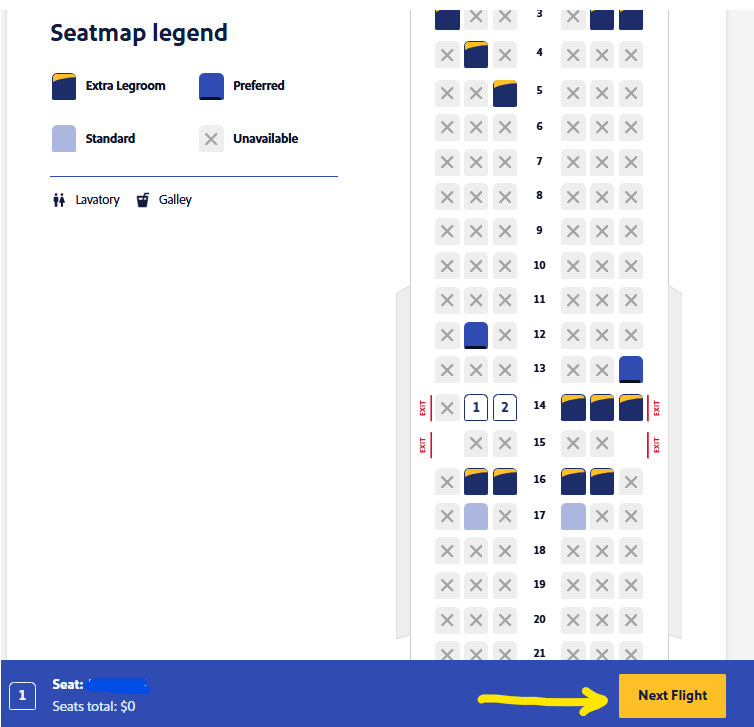
Here is the seat map (grabbed later from the desktop site) for our first leg. The only thing you can select after picking your new seats is “Next Flight” on the lower right.
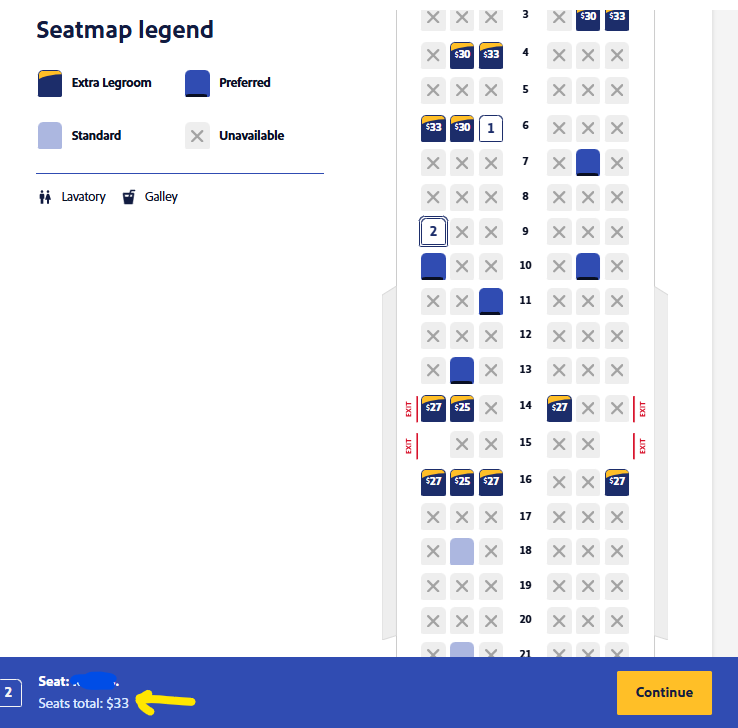
However, when you do that and try to pick seats for the connecting flight (which is still > 48 hours before departure), the system will charge you the current upgrade price, $33 in my case (below). If you just cancel out of seat selection you will lose your first segment seats. So, how do you avoid that and paying for the second segment?
How to avoid this situation and get your upgrade
To avoid either losing your seat upgrade on the first leg, or having to pay for the second leg, select your seats this way. First, select your upgraded seats for the first flight. Click “Next Flight” as I showed above. Then, do not change your seats on the second flight. Just click continue, then finish. While that sounds extremely simple, it was not intuitive when we tried the first time.
Once your connecting flight is within the 48-hour window, repeat the process but in reverse. For the first flight change nothing and click “Next Flight”, then choose your new seats for the second flight and finish the process.
I hope over time Southwest simplifies this and allows both segments to be upgraded together. On the flip side, this does create a truly level playing field for passengers trying to upgrade their seats. There is no longer an advantage to having a connecting flight as there was for the second leg at T-24 check in for boarding position.
What has been your experience with the new Southwest seat upgrades? Leave a comment below and let me know!
TL;DR: Southwest’s new 48-hour upgrade window for extra-legroom seats applies strictly to each individual flight segment rather than the entire itinerary. To avoid paying for seats that would otherwise be free, A-List members and top-tier credit card holders must wait until each specific leg is within the 48-hour cutoff before attempting to upgrade.